
Introduction to the Wayback Machine
In today’s fast-moving digital age, where web pages change by the minute and content can disappear without warning, the ability to access the past is more critical than ever. This is where the Wayback Machine plays a transformative role. Operated by the Internet Archive, this powerful digital tool acts as the internet’s memory—preserving over 800 billion web pages as of 2025. The Wayback Machine gives us a window into the digital past, enabling users to see how websites looked and functioned years ago. But beyond nostalgia, it’s a vital tool for transparency, research, and accountability.
Whether you’re tracking down deleted tweets, viewing lost research, checking how company policies evolved, or referencing information for legal use, the Wayback Machine provides a digital safety net. It brings permanence to an otherwise ephemeral web. Especially in 2025, amid increasing concerns over misinformation, digital manipulation, and data loss, the Wayback Machine’s role has become even more prominent.
This article will explore everything from how the Wayback Machine operates, who uses it, how to access it effectively, and its growing significance for journalism, law, and public knowledge. As we move toward 2030 and beyond, we’ll also look into predictions about how it may evolve and expand globally.
What Is the Wayback Machine?
The Wayback Machine is a digital archive of the World Wide Web. It was launched in 2001 by the Internet Archive, a non-profit organization based in San Francisco. Its mission? To preserve knowledge and make information accessible to all. Named after the time-traveling device from the cartoon Peabody’s Improbable History, the Wayback Machine captures snapshots of websites at various points in time, storing them permanently for public use.
But how does it work? Think of it as a robot that continuously browses the internet, copying and storing content from millions of websites. These “snapshots” are taken periodically and added to the archive’s massive database. When you search for a site on the Wayback Machine, you’re essentially accessing a historical copy from a specific date.
While most people associate it with visual snapshots of websites, the Wayback Machine also stores metadata, source code, and in some cases, downloadable files like PDFs or images. It’s a goldmine of information, especially for those who rely on accurate, unedited data for research or investigation.
As of 2025, the platform supports over 100 languages and has archived websites from nearly every country on the planet. From capturing early 2000s blog posts to preserving public records and even governmental data, the Wayback Machine has become a vital part of the internet’s infrastructure.
Why the Wayback Machine Matters in 2025
In 2025, the digital landscape is flooded with content—but not all of it is trustworthy. In fact, with the rise of misinformation, deepfake content, and frequent takedowns of controversial or sensitive data, having a reliable, independent archive is essential. That’s exactly what the Wayback Machine provides.
Organizations, journalists, and everyday users depend on the Wayback Machine to validate claims, uncover coverups, and recover lost or deleted content. It serves as a neutral third party that doesn’t bend to political or corporate pressure. Whether you’re uncovering deleted government documents or analyzing how media narratives have changed over time, the Wayback Machine is a digital record keeper you can trust.
The rise of ephemeral content (like disappearing stories and temporary tweets) makes the internet less reliable than ever before. The Wayback Machine counteracts that by ensuring no piece of published data is truly gone. In fact, courts around the world have begun accepting Wayback Machine snapshots as legal evidence.
Furthermore, it helps enforce accountability. Companies and public figures are less able to rewrite history if their previous statements, policies, or web pages are archived and publicly accessible. For instance, in cases of corporate greenwashing or political flip-flopping, users can check what was originally stated on official websites years ago.
As we become more reliant on digital platforms for education, communication, and governance, the permanence offered by the Wayback Machine is more crucial than ever.
How to Use the Wayback Machine
Using the Wayback Machine is remarkably simple, even for those with limited tech experience. Here’s how you can dive into the digital past:
-
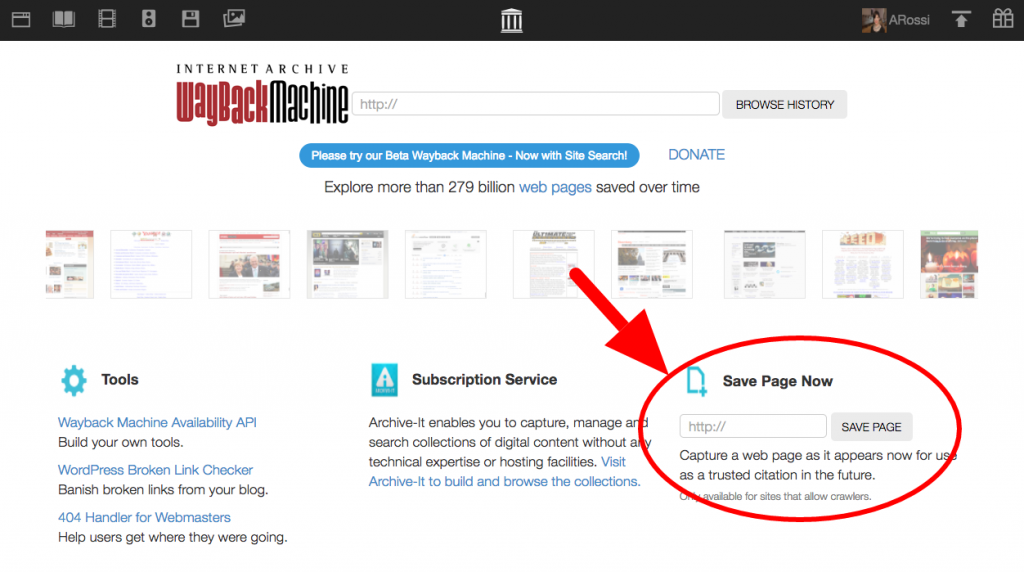
Go to archive.org/web – This is the homepage of the Wayback Machine.
-
Enter a URL – In the search bar, type the full URL of the website or page you want to view (e.g.,
www.nytimes.com). -
Browse the calendar – Once the site loads, you’ll see a timeline showing every year that has been archived, along with a calendar view of specific capture dates.
-
Select a date – Click on a date to view how the website looked on that day.
Advanced Usage:
-
Save Page Now: Want to preserve a current version of a webpage? Just enter the URL and hit “Save Page Now” to add it to the archive instantly.
-
Compare Snapshots: Use the comparison feature to see how a website changed between two dates.
-
Explore URLs with Keywords: If you don’t know the exact URL, you can still search by domain and keywords.
Journalists, researchers, and historians often use the Wayback Machine with browser extensions or its API for faster access and integration into research tools. For those dealing with legal matters, downloading snapshots as PDFs or printing the page with timestamp and URL provides credible documentation.
In just minutes, anyone can navigate through decades of online history—no login or technical expertise required.
Key Features and Tools of the Wayback Machine
The Wayback Machine is more than just a snapshot viewer—it’s a comprehensive archiving suite designed for diverse users and use cases. Let’s break down its core tools:
1. Save Page Now
This is one of the most powerful features. If you come across a page you think might be edited, deleted, or otherwise lost, you can archive it instantly. Just plug in the URL and click “Save Page Now.” The tool will crawl and preserve it on the spot, giving you a timestamped version.
2. Comparison Tool
Want to see how a company’s privacy policy evolved over time? The Wayback Machine offers a comparison feature where you can view differences in snapshots. This side-by-side visual comparison is extremely helpful for journalists and watchdogs.
3. Search by Keyword or Domain
Even if you don’t have a full URL, the system allows partial or fuzzy searches. This is ideal for exploring a site’s structure, past versions, or related content.
4. API Access
Developers and researchers can use the Wayback Machine API to automate queries, build tools, or integrate archiving into content management systems. This feature is particularly popular with large organizations managing thousands of URLs.
5. Mobile Access
The Wayback Machine has also been optimized for mobile devices. Whether you’re on a tablet or smartphone, the interface adjusts for convenient browsing and archiving on the go.
These features transform the Wayback Machine from a passive tool into a dynamic platform, allowing users to contribute, compare, preserve, and analyze the internet’s vast history.
Who Uses the Wayback Machine Today?
In 2025, the Wayback Machine is no longer just a tool for tech-savvy users. Its utility has expanded across professional industries, academic institutions, governments, and even the general public. Let’s explore who uses it and why.
1. Journalists and Media Organizations
Journalists frequently rely on the Wayback Machine to hold individuals and institutions accountable. Whether it’s retrieving deleted political statements, uncovering past versions of corporate websites, or fact-checking historical claims, the archive offers indisputable proof of digital footprints. In fact, some major exposés published in global outlets such as The Guardian or The Washington Post have cited Wayback Machine snapshots as evidence.
2. Legal Professionals
Lawyers and legal researchers use the archive to reference past versions of web content in court cases. Archived material has been accepted as legal evidence in various jurisdictions. For instance, in intellectual property disputes or cases involving misleading advertising, historical web content provides an immutable record of what was said or published online.
3. Historians and Academics
Universities and researchers across disciplines use the Wayback Machine to study societal, political, and economic changes. It offers insights into how narratives evolved, how governments presented public policy, and how online communities have changed over the years. Historical websites that may no longer exist elsewhere are often preserved in the archive.
4. Educators and Students
Teachers use it to demonstrate how online content changes over time and to teach digital literacy. Students access it to retrieve references, source old reports, or examine web-based primary sources for historical research.
5. Everyday Users
From individuals trying to find a defunct website they used to visit, to someone looking for a recipe or guide that was taken down, regular users find value in the Wayback Machine daily. Bloggers, researchers, and social media users also use it to back up claims and protect against data loss.
Its broad user base underscores the growing reliance on web archiving for integrity, education, and truth in the digital space.
The Wayback Machine vs. Other Archiving Tools
While the Wayback Machine is the most well-known digital archive, it’s not the only one. There are several other archiving services available, each with its own strengths and limitations. Let’s take a closer look at how it stacks up against competitors.
1. Archive.today
Archive.today (also known as archive.ph) is a popular alternative that specializes in capturing web pages as static images. It focuses more on immediacy than breadth. While it’s effective at archiving individual pages quickly, it lacks the extensive database and historical depth of the Wayback Machine.
2. Perma.cc
Developed by Harvard Law School, Perma.cc is used primarily in academic and legal contexts. It allows users to create permanent, unalterable records of online sources. However, it’s more restrictive—access often requires a subscription or institutional account, and its archives are limited to user-saved content.
3. Google Cache
Google Cache provides temporary cached versions of web pages stored by Google’s search engine bots. While it can show recent changes, the cache is not permanent and can disappear within days or weeks. It also lacks the historical depth or user-controlled archiving options that the Wayback Machine offers.
4. GitHub and Web Archives
Developers sometimes use GitHub to host static versions of websites, and some independent groups operate niche archives for specific topics. However, these are limited in scope and do not offer public browsing or search features as robust as those found in the Wayback Machine.
Comparison Table
| Feature | Wayback Machine | Archive.today | Perma.cc | Google Cache |
|---|---|---|---|---|
| User Contributions | ✅ | ✅ | ✅ | ❌ |
| Snapshot Depth | ✅ Extensive | Moderate | User-defined | Very Limited |
| Legal Use in Courts | ✅ | ✅ | ✅ | ❌ |
| Real-Time Archiving | ✅ (Save Page) | ✅ | ✅ | ❌ |
| Search Capabilities | ✅ Advanced | Basic | Limited | ❌ |
| Public Access | ✅ Free | ✅ Free | Restricted | ✅ Free |
The Wayback Machine clearly leads in scope, reliability, and depth. While others serve niche needs, none match the comprehensive, open-access archive it provides.
Real-World Examples of the Wayback Machine in Action
The Wayback Machine has been instrumental in many high-profile cases, making a significant impact across industries. Let’s dive into real-world stories that showcase its effectiveness.
1. Political Accountability
In multiple election cycles across the United States and Europe, the Wayback Machine has exposed attempts by politicians to alter or erase past positions. For instance, during the 2020 and 2024 U.S. elections, journalists used the tool to uncover deleted campaign pledges from official websites. These archives were cited in debates and even referenced in televised interviews to highlight inconsistencies.
2. Corporate Transparency
Major corporations have faced backlash after their past practices or statements, once buried, were rediscovered through the Wayback Machine. A well-known environmental scandal in 2023 involved a multinational oil company claiming recent commitments to clean energy. Archived web pages proved that similar promises were made (and never fulfilled) a decade earlier. Shareholders used this evidence in legal action over misleading sustainability claims.
3. Academic Preservation
Many universities and research bodies use the Wayback Machine to preserve academic journals, syllabi, and departmental pages that may otherwise vanish during website overhauls. In one instance, a university was able to recover critical research data stored on a lab website that was accidentally deleted during a migration.
4. Legal Evidence
In courtrooms across the globe, archived web pages have become vital. In a 2022 European copyright dispute, attorneys presented Wayback snapshots to prove the original ownership and publishing date of digital content. The court accepted the records as valid evidence, establishing a precedent for future cases.
5. Censorship and Whistleblowing
In countries with restricted media, the Wayback Machine has enabled journalists and activists to preserve articles and web pages that were taken down under government pressure. These archives are used by international watchdogs to document censorship and ensure that silenced voices remain visible.
From legal victories to holding the powerful accountable, the Wayback Machine plays a critical role in protecting truth and memory in the digital age.
The Wayback Machine and Freedom of Information
Access to accurate information is a cornerstone of democracy, and the Wayback Machine has become an unexpected champion in that fight. Its existence supports freedom of information in multiple ways—while also facing serious challenges from those who want to control the narrative.
1. Preserving Unfiltered Information
When websites are modified or taken down, the Wayback Machine often retains the original version. This allows the public to compare what was once said or promised versus what is being claimed now. Whether it’s a government policy that was edited post-facto or a company’s website cleaned up after a scandal, the archive maintains an unfiltered record.
2. Bypassing Censorship
In countries where media is heavily regulated or online censorship is prevalent, the Wayback Machine offers a window to blocked content. Activists and researchers in countries like China, Iran, and Russia use the tool to access websites or news articles that are no longer reachable through traditional means.
3. Supporting Investigative Journalism
For investigative journalists, the Wayback Machine acts like a library of hidden truths. Archived pages have revealed shady dealings, exposed misinformation campaigns, and shed light on how organizations manipulate public opinion. Its neutrality and automated approach make it difficult to tamper with.
4. Facing Takedown Requests
Despite its value, the archive isn’t immune to pressure. The Wayback Machine receives legal requests—mostly through DMCA takedown notices and court orders—to remove or restrict certain archived pages. While it complies in specific legal scenarios, its operators are committed to transparency and publish takedown statistics regularly.
5. The Battle for Digital Freedom
The Internet Archive has faced lawsuits, funding limitations, and political pressure. However, its mission to provide universal access to all knowledge keeps it pushing forward. In 2024, a new initiative was launched to decentralize the archive, allowing for mirrored versions to exist globally and reduce vulnerability to any single legal system.
In a world where information is power, the Wayback Machine ensures that history cannot simply be rewritten or deleted. Its role in protecting digital memory is foundational to maintaining freedom and accountability.
Global Impact of the Wayback Machine
The Wayback Machine is not just an American project—it has a global footprint. Used in over 200 countries, its influence on information access, digital literacy, and policy is growing rapidly.
1. Usage Patterns by Region
-
North America and Europe lead in daily traffic and institutional partnerships.
-
Asia and Africa show the fastest growth in user numbers, particularly in academic and journalistic circles.
-
Latin America has seen a surge in government use to ensure public records transparency.
2. Local Archiving Initiatives
Several nations have partnered with the Internet Archive to host local mirrors of the Wayback Machine. These initiatives are especially critical in regions prone to censorship or data loss. For example, in India and South Africa, educational institutions have joined forces to preserve regional content that is culturally and politically significant.
3. Government and NGO Collaboration
Governments in the EU and Australia are integrating web archiving as part of their digital governance strategies. NGOs worldwide use the Wayback Machine to track development promises, climate pledges, and humanitarian commitments.
4. A Tool for Justice and Human Rights
Organizations like Human Rights Watch and Amnesty International use archived web content to document evidence in human rights investigations. Archived news articles, official statements, and government documents have been instrumental in creating timelines and proving intent in conflict zones.
The global expansion of the Wayback Machine represents a major leap in the democratization of knowledge, ensuring that digital history is accessible, protected, and preserved—regardless of geography.
Limitations and Challenges
While the Wayback Machine has become an indispensable tool in the digital era, it’s not without its limitations. As with any large-scale technology built to serve public access, there are technical, legal, and ethical issues that shape how effective and reliable it can be.
1. Incomplete Archives
Despite having billions of snapshots, the Wayback Machine doesn’t capture everything. Websites can block its crawler using a robots.txt file or server settings, preventing the archiving of certain pages. Additionally, dynamic content—like JavaScript-rendered pages, forms, and databases—often doesn’t archive properly, leaving gaps in records. Videos, user-generated comments, and downloadable files may also be missing from older snapshots.
2. Broken Links and Errors
Not every saved page loads perfectly. Archived pages might display improperly due to missing stylesheets, external scripts, or file dependencies that weren’t captured during the snapshot. This makes some historical content difficult to read or navigate.
3. Legal and Copyright Hurdles
The archive sometimes faces legal requests to remove content. These include Digital Millennium Copyright Act (DMCA) takedown notices, court orders, and privacy complaints. While the Internet Archive tries to maintain transparency and keep content publicly accessible, it must comply with specific legal requirements. This can limit access to controversial or high-value content.
4. Ethical Concerns
There are debates around archiving sensitive or personal data. For instance, someone might regret publishing personal blogs or controversial opinions in the past but find them permanently stored in the archive. This raises concerns over consent, privacy, and digital reputation.
5. Financial Sustainability
Being a non-profit, the Internet Archive relies heavily on donations, grants, and public support. As the volume of data increases exponentially, maintaining servers, bandwidth, and staff becomes increasingly challenging. In 2024, the Internet Archive announced budget constraints affecting the frequency of global crawls, signaling the need for more robust financial support.
In spite of these challenges, the Wayback Machine continues to evolve. Its mission to preserve the truth and democratize access to knowledge remains vital—but so does the need for technological, legal, and ethical solutions to protect both access and privacy.
The Role of AI and Machine Learning in Archiving
Artificial Intelligence and Machine Learning (ML) are revolutionizing the field of digital preservation, and the Wayback Machine is at the forefront of adopting these technologies to improve accuracy, efficiency, and scale.
1. Smarter Crawling and Prioritization
Traditional web crawlers capture data in a linear, rule-based fashion. But with AI integration, the Wayback Machine can now prioritize high-value or at-risk content—like breaking news, endangered research, or politically sensitive pages. AI models assess which pages are most likely to be altered or removed, allowing for proactive archiving.
2. Improved Snapshot Quality
Machine learning algorithms help clean up snapshots and fill in gaps caused by missing assets or broken code. This results in more accurate and readable archived pages, even when the source content is complex or dynamic. AI also enables better rendering of mobile versions and responsive designs, ensuring that more content is preserved regardless of platform.
3. Language and Metadata Recognition
Multilingual websites and pages with embedded metadata benefit from AI tools that automatically detect and classify content. This enhances searchability and categorization across different cultures and languages, making the archive more accessible globally.
4. Automated Tagging and Content Analysis
Natural Language Processing (NLP) helps classify archived content by topic, sentiment, or historical relevance. This makes it easier for researchers to filter results and track trends across time. For example, an AI could highlight changes in climate policy terminology across years or analyze sentiment in political manifestos.
5. Predictive Archiving
Machine learning can anticipate which websites are likely to go offline or undergo significant changes based on traffic patterns, domain expiration records, or hosting vulnerabilities. This enables the Wayback Machine to take proactive snapshots before critical information is lost.
By integrating AI, the Wayback Machine becomes not just a passive recorder of history but an active participant in digital preservation, ensuring that content is captured in a smarter, faster, and more reliable way.
Partnerships and Collaborations
The Wayback Machine’s impact has been amplified through strategic collaborations with institutions, governments, and tech organizations. These partnerships are essential for broadening its reach, increasing data security, and ensuring long-term sustainability.
1. Academic Libraries and Universities
Top universities around the world have joined forces with the Internet Archive to preserve scholarly resources, departmental websites, and digital theses. Institutions like MIT, Stanford, and Oxford contribute regularly to web preservation through joint archiving initiatives. This not only protects academic history but also enhances educational accessibility for future generations.
2. Government and Legal Archives
In countries like Australia, Canada, and the EU, national archives have formed partnerships with the Wayback Machine to back up critical government documents and citizen services. These collaborations ensure transparency and allow citizens to access historical policy statements, budget data, and legislative records long after they’ve been updated or removed.
3. Non-Governmental Organizations (NGOs)
Organizations like the United Nations, Human Rights Watch, and Transparency International work with the Wayback Machine to preserve digital content related to human rights, environmental reporting, and governance. Archived data supports accountability by keeping an immutable record of official reports and statements.
4. Tech Partnerships
In recent years, partnerships with tech companies like Cloudflare and GitHub have helped improve archiving speeds and coverage. These platforms contribute infrastructure or integrations that make it easier to capture dynamic content or respond to rapid changes on the internet.
5. Open Source and Civic Technology Initiatives
Collaborations with civic tech groups have produced open-source tools, browser extensions, and APIs that enhance the archive’s usability. These tools make it easier for journalists, developers, and watchdog organizations to access and contribute to the archive in meaningful ways.
Partnerships are the foundation of the Wayback Machine’s global impact. By working with like-minded institutions and organizations, it continues to scale, innovate, and preserve the world’s digital history.
Preserving Multimedia Content
As the internet evolves beyond text into a rich multimedia experience, preserving video, audio, and interactive content has become one of the biggest challenges in web archiving. The Wayback Machine is rising to meet this demand with new strategies and technologies.
1. Video and Audio Preservation
Platforms like YouTube, Vimeo, and SoundCloud dominate online media—but archiving them is complex due to copyright issues and dynamic loading. The Wayback Machine has developed tools to capture embedded videos and preserve metadata, though actual playback of archived media remains limited in some cases due to copyright restrictions.
Nonetheless, many public domain or creative commons videos are safely stored and playable through the archive. In educational contexts, lectures and tutorials are being backed up regularly through collaborative efforts with schools and nonprofits.
2. Interactive and Dynamic Content
Modern websites often include interactive features like quizzes, forms, maps, or chatbots. These elements don’t always function in archived versions. However, recent innovations—such as JavaScript emulation and browser-based sandboxing—are allowing better preservation of dynamic features.
3. PDFs, Images, and Attachments
The Wayback Machine also captures downloadable content, such as whitepapers, research articles, PDFs, and images. These are vital for academic and governmental archiving. Metadata tagging ensures that these files are indexed and retrievable by keyword, topic, or file type.
4. Gaming and Digital Artifacts
A newer focus for the Internet Archive includes archiving Flash games, animations, and early internet art. These artifacts are part of digital culture and are preserved using emulators and advanced rendering engines that mimic original environments.
5. Accessibility and Mobile Content
As mobile browsing surpasses desktop usage, the Wayback Machine is optimizing for mobile-first content. It preserves mobile layouts and app-based content, ensuring that responsive websites retain their structure and usability in future years.
With an ever-expanding scope, the Wayback Machine is evolving from a text-based archive into a full-spectrum digital preservation hub—ensuring that audio-visual history is just as accessible as written content.
Protecting Your Digital Footprint
While the Wayback Machine is a powerful public tool, individuals and organizations are increasingly concerned about controlling their digital legacy. Knowing how your content is archived—and how to manage it—is becoming an important part of digital literacy.
1. How Content Gets Archived
Most websites are archived automatically through public crawling. However, users can also manually submit a page for archiving using the “Save Page Now” feature. Once captured, the content is indexed and added to the archive’s growing database.
2. Privacy and Takedown Requests
If someone wants content removed from the Wayback Machine, they can file a takedown request. The Internet Archive reviews these for validity under copyright law, privacy concerns, or sensitive data exposure. While it honors legitimate requests, not all removals are guaranteed—especially for content considered part of the public record.
3. Controlling Public Content
Website owners can block future archiving using a robots.txt file or special metadata. However, these blocks don’t always apply retroactively to content already archived. Some institutions also use no-archive headers to prevent archiving altogether.
4. Personal Reputation Management
With old blogs, social media pages, or controversial posts archived for years, managing digital reputation is vital. Individuals can monitor their content using reverse URL tools or reputation management services that flag and address sensitive archival content.
5. Organizational Policies
Businesses and institutions are creating formal guidelines for content lifecycle management—deciding which pages to allow for archiving and how to address customer or legal concerns. Transparency statements and archive disclaimers are also increasingly common.
Digital permanence is both an opportunity and a challenge. The Wayback Machine helps ensure history isn’t erased, but users must also be informed and proactive in managing what history is captured.
The Future of the Wayback Machine: Predictions for 2030
As we look ahead to the next five years, the Wayback Machine is poised to become even more integral to digital life. With the growing complexities of the internet, including artificial intelligence-generated content, misinformation surges, and global cyber threats, the need for trustworthy digital preservation has never been more urgent.
1. Greater Global Accessibility
By 2030, we can expect to see expanded international collaborations and localized versions of the archive in more countries. This will support access to culturally relevant and language-specific content while reducing reliance on centralized servers. Local data centers could ensure continuity even in the event of geopolitical or technological disruption.
2. Blockchain Integration
Emerging technologies like blockchain may play a critical role in ensuring the authenticity of archived content. By time-stamping and verifying archived data on a distributed ledger, the Wayback Machine could offer enhanced protection against manipulation or unauthorized deletion.
3. Advanced AI-Driven Archiving
Artificial intelligence will continue to refine the process of identifying, capturing, and cataloging web content. AI will likely predict which pages need archiving based on news trends, user behavior, or algorithmic analysis. This will result in smarter, faster, and more meaningful preservation.
4. Real-Time and Auto-Archiving
Future updates may allow for real-time archiving of high-risk or time-sensitive pages. As APIs and plugins integrate directly with content management systems, users might enable auto-archiving of blog posts, articles, or press releases at the moment of publication.
5. Immersive and Interactive Archives
As virtual and augmented reality content becomes more common, the Wayback Machine will likely adapt to preserve immersive digital experiences. This includes capturing 3D content, interactive tutorials, and metaverse platforms, ensuring that the next frontier of the web is not lost to time.
6. Greater Legal and Policy Support
More governments and legal institutions are expected to formally recognize archived content as valid evidence. This could lead to better policies around digital preservation, online accountability, and fair use of archived material in education, journalism, and litigation.
In a world where digital information shapes perceptions, politics, and progress, the Wayback Machine’s evolution is not just desirable—it’s essential. By 2030, it will likely serve not just as an archive but as a public utility and cornerstone of digital integrity.
Conclusion
The Wayback Machine stands as one of the most powerful tools of the digital age. More than just a website or technical archive, it is a living memory bank of the internet—preserving knowledge, protecting truth, and empowering users across the globe. In a time when information is often fleeting, manipulated, or lost, the Wayback Machine offers permanence and transparency.
From journalists uncovering buried scandals, to educators teaching the evolution of online media, to everyday users retrieving nostalgic or critical content, the Wayback Machine provides value far beyond convenience. It’s a resource for democracy, accountability, and digital education.
As we move into the next decade, innovations in AI, blockchain, and global collaboration will further solidify its role in preserving the past and safeguarding the future. With growing threats to information access and online truth, the importance of such a tool cannot be overstated.
The Wayback Machine is not merely a record of where we’ve been—it’s a compass pointing toward a more transparent, informed, and connected digital future.
FAQs
1. Can I request the removal of a page from the Wayback Machine?
Yes, the Internet Archive allows users to submit takedown requests for pages that violate copyright, privacy rights, or other legal concerns. However, not all requests are granted, especially if the content is of public interest.
2. How often does the Wayback Machine archive a website?
There’s no fixed frequency. High-traffic websites may be crawled daily or weekly, while smaller or blocked websites might be archived less frequently or not at all.
3. Is the Wayback Machine free to use?
Yes, the Wayback Machine is completely free and publicly accessible. Users can browse, save, or retrieve archived pages without creating an account or paying any fees.
4. Can I use Wayback Machine snapshots in legal cases or academic research?
Absolutely. Many courts accept snapshots as admissible evidence, and scholars often use them to cite historical content. It’s advisable to include the URL, timestamp, and page source when referencing.
5. Does the Wayback Machine store video or interactive content?
It stores some embedded videos, PDFs, and static interactive content. However, highly dynamic or proprietary media platforms (like YouTube or TikTok) may not be fully archived due to technical and legal restrictions.
6. How does the Wayback Machine choose which pages to archive?
It uses automated web crawlers that prioritize based on traffic, importance, and technical accessibility. Users can also manually submit URLs to ensure specific content is archived.